QuPath - Making a project, compatible with ABBA
Warning
Do not modify the images present in the project once it has been opened and used in ABBA. ABBA risk not to behave properly if the images in the QuPath project are changed.
Hint
Working with a QuPath project is the preferred way to work with ABBA, because it facilitates a lot downstream processing.
Dataset pre-requisites
ABBA is designed to work on a set of slices belonging to a single animal. If multiple animals need to be aligned, then each animal should be aligned independently - one per QuPath project. It’s not a strict restriction and you can combine images coming from different animals in a single dataset. However, you won’t have full flexibility for the registration. Namely, you will not be able to set different cutting angles for different animals.
Now, let’s discuss a bit what sort of images can be used. ABBA can:
read all Bio-Formats supported formats
stream data from OMERO
work on any XML defined BigDataViewer dataset
read a QuPath project (which internally uses Bio-Formats and OMERO)
Also please make sure to read the message about pyramidal file formats requirements.
Define a dataset of brain sections in QuPath
As in the recommended workflow, you first need to create a QuPath project that contains all the brain slices that you want to register - usually from one animal.
To learn how to do that, please check the relevant part of the QuPath documentation: https://qupath.readthedocs.io/en/latest/docs/tutorials/projects.html
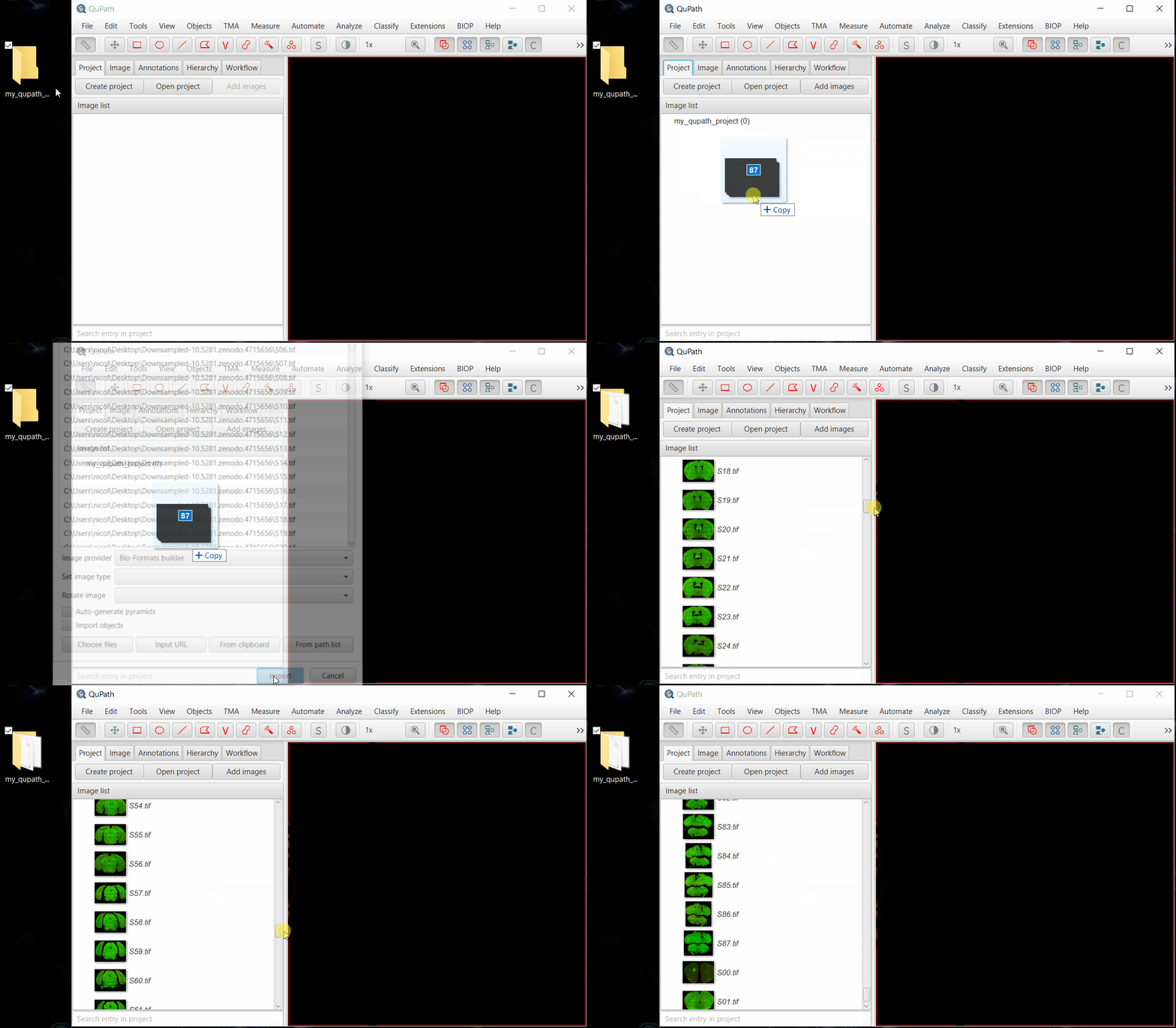
Briefly, setting-up a project is as follow:
(you can dowload a demo dataset)
create a project by dragging and dropping an empty folder into QuPath’s GUI
drag and drop your images to append them into this QuPath project
select
Bio-Formats builderand then click Import
Note
If you use OMERO, you can directly append your images by browsing your OMERO server.
Extensions > OMERO-RAW > Browse server...
Note: you can also work with OMERO images, as long as they are loaded through the OMERO-RAW QuPath extension.
Warning
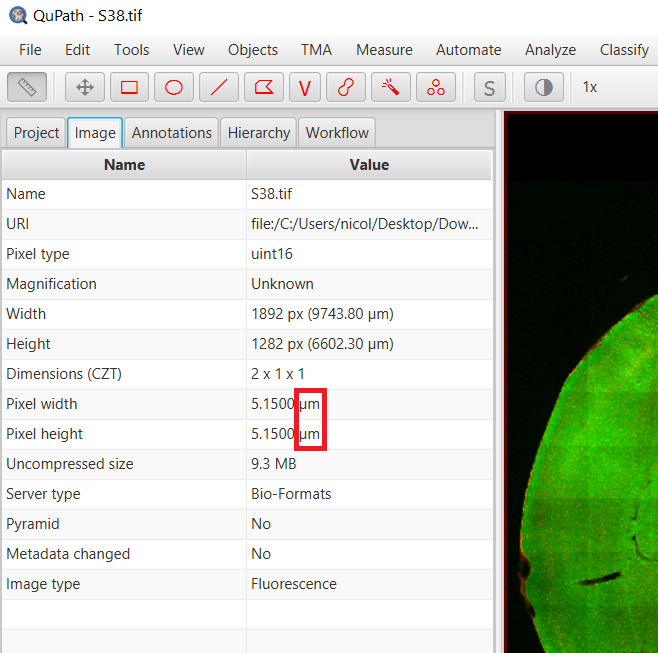
All files need to be properly calibrated (microns, millimeters, etc, but not pixels!). Check on the Image tab of QuPath that you have a proper physical unit specified for your images, and not pixels! If that’s not the case, you should specify the correct pixel size NOW! (= BEFORE importing the project into Fiji’s ABBA plugin). Otherwise, the images will look gigantic because 1 pixel is assumed to be 1 millimeter…
You are done for now on the QuPath side. You can let QuPath open while performing the rest of the workflow.